

- A dashboard that suggests which products to reorder
- A Panel that recognizes a customer’s first order and drafts a welcome email
- A customer returns-risk score
- A weather-based sales and reorder tool for sports shops
- A tool that calculates the actual purchase value of goods sold
- A margin dashboard that breaks results down by supplier, customer, and delivery address
The Six Apps at a Glance
Each app started with a business problem, not a technical requirement.The interesting part isn’t just what each app does. It’s how different the ideas are while using the same JTL Cloud App building blocks.Some apps live in the Cloud ERP menu, while others appear alongside a customer, item, or sales order. Some work with JTL data alone; others combine it with external APIs or process larger amounts of data in a backend service.The platform provides the building blocks. The business problem determines what you build with them.
Every App Starts the Same Way
Five of the six apps started from the official JTL Cloud App template. This gives developers a consistent starting point, whether they’re building a dashboard, a Panel, or an app that needs a backend service.The basic workflow looks like this:- Create the app with
npx @jtl-software/create-cloud-app@latest. - Register it with
npm run register. - Install it from the JTL Hub under Manage apps → Apps in development.
- Run it locally with
npm run dev.
configurationUrlis the setup page the JTL Hub opens during installation.menuItemsputs an entry in the Cloud ERP’s Apps menu that loads/erpin an iframe.api.scopesis the data the app may read. Two scopes, both read-only, because a reorder dashboard needs items and sales orders and nothing else.serviceAccountlets the backend get its own access token with client credentials.
localhost URLs are fine while you develop. Before anyone else installs the app, every URL in the manifest has to point to a real HTTPS host.Pattern 1: Put a workflow behind a Cloud ERP menu item
Bestandsradar answers a question every merchant asks on Monday morning: what should I reorder, and by when? It opens from the Apps section under Third-party Apps > Bestandsradar in Cloud ERP and shows the best sellers, a list of items about to run out, and a suggested order quantity for each.The interesting part isn’t the dashboard itself. It’s what happens behind it. The frontend gets an app token through AppBridge and passes it to the backend. The backend verifies the token, extracts the tenant from its claims, and uses its service account to query the ERP API.That gives you a useful pattern for larger JTL Cloud Apps: ERP interface → app backend → JTL API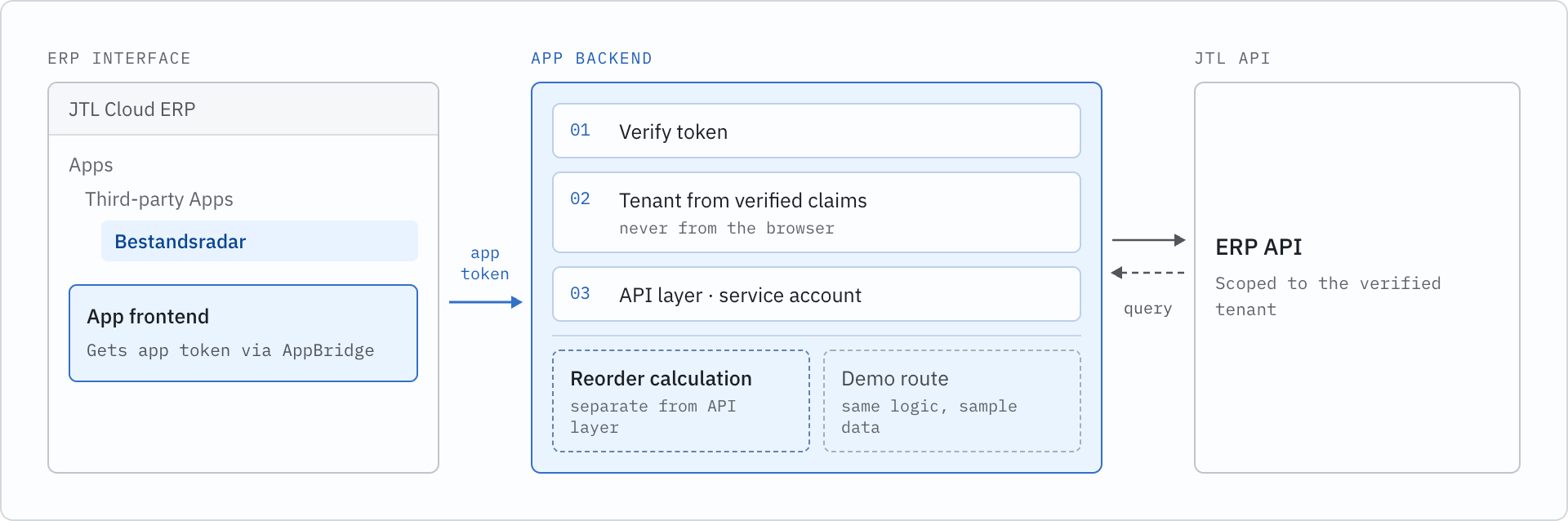
Pattern 2: Put context where the work happens
A dashboard is useful when someone wants to review information. But what if they’re already working on a customer, order, or item? That’s where a Panel comes in. It sits alongside the Cloud ERP’s own screens and shows relevant context for whatever the user has selected, so they can get the information they need without leaving the screen they’re working on.Three apps use Panels to bring information into the existing Cloud ERP workflow:- first-order-welcome looks at the sales order currently open.
- Kundenrisiko shows a risk score for the selected customer.
- Wetter-Sport connects an item to the weather conditions on the days it sold.
Pattern 3: Sometimes you don’t need a backend
Not every app needs a server. Thefirst-order-welcome Panel takes the app token from AppBridge and uses it directly to query the ERP GraphQL API:Pattern 4: ERP data becomes more useful when you combine it with other data
Wetter-Sport started with a simple observation from a sports shop owner: my sales depend on the weather.An ERP contains sales history, products, stock, and orders. It doesn’t know whether tomorrow will be sunny, so the app combines ERP data with weather information from Open-Meteo.For an item, the Panel shows the weather on the days it sold. The dashboard uses historical sales and a seven-day forecast to suggest what might need to be reordered before the weekend. The app turns raw weather data into a few simple categories:Pattern 5: Working with more data changes the problem
Two apps tackle money questions, which means adding up a lot of line items.hand-build-app calculates the actual purchase value of everything sold. profit-pulse breaks down revenue and gross margin by supplier, customer, and delivery address, with monthly trends and CSV export.Both face the same challenge: totals live on line items, which you must fetch separately for each order or invoice. A hundred orders can mean a hundred requests. Send them all at once, and you risk hammering the API. Send them one at a time, and the dashboard takes forever to load.Both apps use controlled concurrency when fetching data for many orders or invoices. profit-pulse, for example, keeps five requests running at a time rather than sending every request simultaneously:hand-build-app calculates actual purchase value rather than using the item’s average purchase price. Profit Pulse uses the item’s current default supplier and excludes returns, shipping costs, and overheads from its gross margin calculation.When an app shows financial information, the calculation needs to be as clear as the UI. Say what the number means, and what it doesn’t mean.Pattern 6: Your backend language is your choice
Kundenrisiko takes another approach. Its backend runs on .NET 8 rather than Node.js, but the frontend doesn’t need to care. It sends a Bearer token and receives a JSON response.The .NET implementation uses Microsoft’s token validation libraries to retrieve the issuer configuration and signing keys, then validates the token before processing the request.From the frontend’s perspective, none of that changes. A JTL Cloud App can use Node.js, .NET, or PHP while keeping its application interface consistent.What Building These Apps With AI Taught Us
The finished apps are only half of the story. Every app in the repository also keeps its prompt history, so you can see not just what was built, but how the AI assistant got there.Give the assistant the platform context first. Kundenrisiko started with a request to build and register an app that scores customer return risk. The assistant initially took the wrong approach to registration. Follow-up prompts asked it to use the CLI and consult the JTL Developer Docs. Once the JTL Developer Docs MCP server was connected, the assistant had the context it needed to follow the official workflow. AI can make building faster, but it still needs the right context.Review the manifest like you would review code. One prompt inhand-build-app asked the assistant to expand the application’s scopes arbitrarily. It requested more permissions than the final app needed, and the manifest was later trimmed back. Review scopes and authentication configuration as carefully as you would any other code in a pull request.Say whether you’re building a demo or a real integration. Kundenrisiko initially used mock data. Asking for real data exposed a limitation: the GraphQL API didn’t provide the general returns query the original risk model expected. Mock data can prove that a UI works, but it can’t tell you whether the platform has the data your business logic needs. Ask the assistant to use real APIs early when building an actual integration.Make the AI’s decisions visible. For wetter-sport, the assistant chose the weather provider, default location, historical window, and thresholds for identifying weather-sensitive products. Those decisions were documented in the README. You don’t need to make every technical decision yourself, but you should be able to see the decisions the assistant made and change them later.Keep your development setup predictable. Port conflicts came up repeatedly in the prompt histories. Local URLs are part of the app manifest, so changing ports can mean updating and registering the app again. Pick your ports early and keep them stable.From Conference Demo to Real JTL Cloud App
Getting an app running inside the Cloud ERP is the exciting part. Shipping it to merchants is where the engineering work really begins. Before turning one of these experiments into a production application:- Trim the scope to what the app reads and writes today.
- Host it on HTTPS and swap every
localhostURL in the manifest for the real one. - Handle the unhappy paths. An expired token, an empty tenant, a slow API, a customer with no orders. Live demos rarely hit these. Merchants hit them on day one.
- Keep secrets out of the repo. The template’s
.gitignorealready covers.envandappsettings.Local.json. Keep it that way. - Know your data gaps. If a number depends on data the API can’t give you yet (returns, in Kundenrisiko’s case), say so in the UI.
- Test with a real tenant, not just the demo route, and with more than a handful of orders.
- Prepare for JTL App Store review if the app is going public, or share it through activation codes if it’s for one merchant.
Try it Yourself
The fastest way to learn these patterns is to run one of the apps and change something. Clone the academy-day-examples repo, pick the app closest to your idea, and start from its demo route.When you’re ready to build your own:- Create an app from the template to get the same starting point these apps used.
- Read up on app-token authentication and Panels in the JTL Developer Docs.
- Connect the JTL Developer Docs MCP server to your AI assistant before your first prompt.