

What are JTL Cloud Apps?
A Cloud App is a web application that you host and connect to JTL. It can appear directly inside the Cloud ERP, work with a merchant’s JTL data through the platform APIs, and react to changes through webhooks. Merchants can get your app through the JTL App Store or, for customer-specific solutions, through private distribution with an activation code.That means you can build a product around JTL without building a desktop extension, maintaining software on a merchant’s machine, or asking users to leave their ERP every time they need your functionality.How Cloud Apps WorkThe architecture follows four moving parts:- Your app’s frontend, which runs inside the JTL platform in an iframe and looks and feels like part of the product.
- AppBridge, the channel between your frontend and the JTL platform. Your app uses it to ask for things like the current user’s token or the record they’re looking at.
- Your backend, which talks to the JTL Cloud API and ERP to read and write merchant data.
- Webhooks, which tell your backend when something happens in ERP, such as a new order or a stock change.
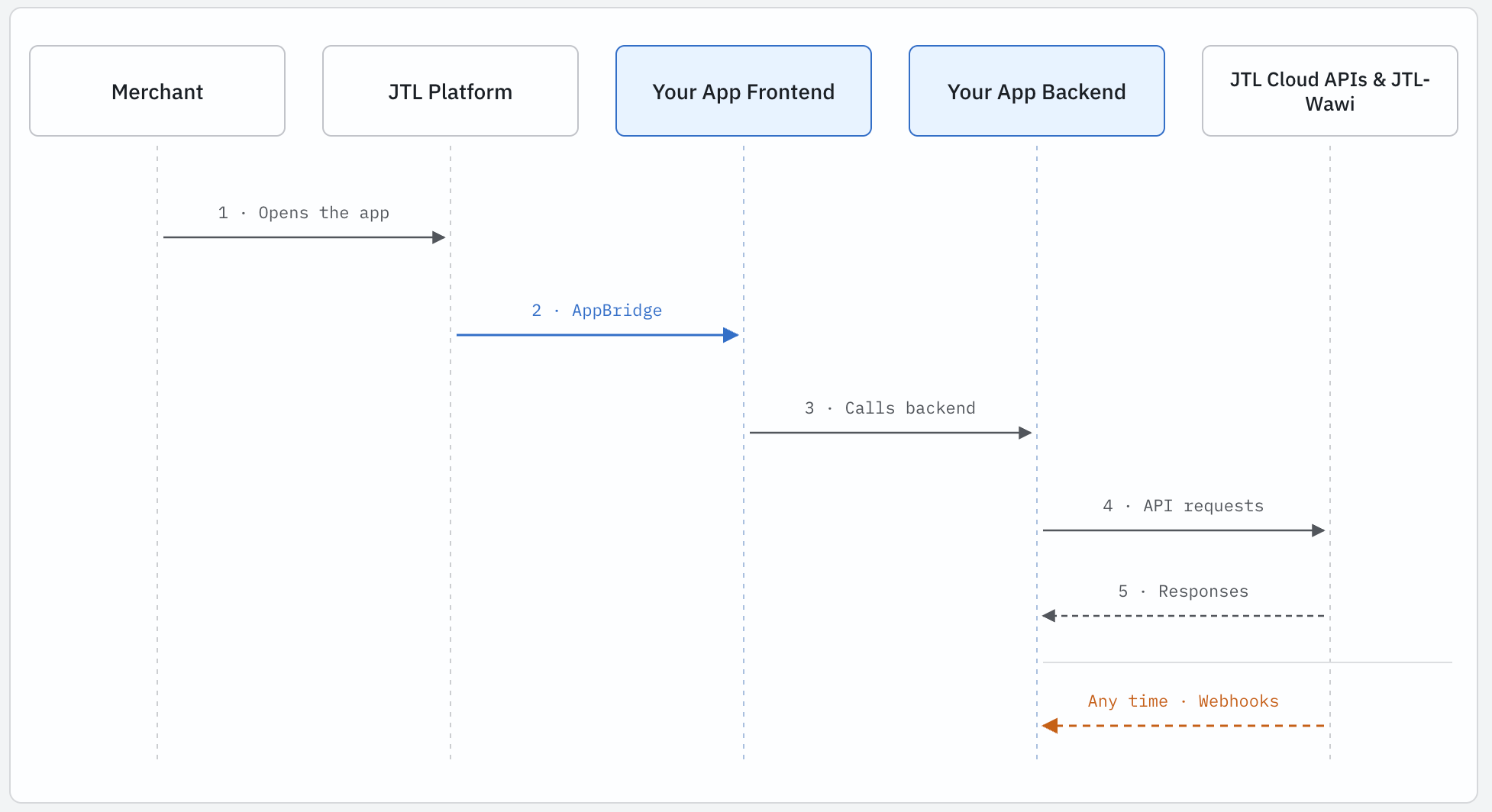
Where your App Shows Up
A Cloud App can meet the merchant in a few different places, and most apps combine two or three of them.Menu items.Your app gets its own entry in the Cloud ERP navigation and opens as a full page. This suits dashboards, configuration screens, and anything the merchant visits on purpose.Context-aware Panels.Panels are useful when the right information depends on what the merchant is currently looking at. For example, imagine a merchant opens a customer record; your app could show:- Recent support conversations
- Outstanding balances from another system
- Customer-specific recommendations
What can you Build with JTL Cloud Apps?
The better question isn’t what kind of app you can build. It’s what part of a merchant’s workflow you can make better.Here are a few examples:A Reporting Dashboard
A retailer wants better visibility into sales performance than the standard reports provide. You could build a menu item app that pulls data from ERP, combines it with data from other systems, and presents a dashboard for things like sales by channel, product performance, and inventory value.The merchant gets a purpose-built view without having to export data and build spreadsheets every week. You build it once, and every merchant with the same question can install it.A Customer Context Panel
You run a customer support tool. Your users keep switching between your helpdesk and the ERP to answer questions like “where’s my order?” or “has this customer returned things before?”You build a Panel that opens beside the customer record in the ERP and shows their open tickets and recent conversations. Now the support history sits next to the order history. Nobody copies customer numbers between tabs, and your product becomes part of the merchant’s daily routine instead of another tool they have to remember to open.Stock Alerts
A merchant’s purchasing team keeps finding out about low stock after a product has already sold out. You build an app that subscribes to stock change webhooks, compares levels against thresholds the merchant sets, and posts an alert to their team chat or sends an email.It’s a small app, but it solves a problem that costs real money every time it happens. Small, focused apps like this are often the easiest to sell.An Integration with an External Service
You offer a shipping, payment, or accounting service, and your customers want it connected to their ERP. Instead of a sync you maintain per client, you build a Cloud App. The merchant installs it, connects their account on your configuration page, and your backend takes it from there.This pattern is useful for products where the main value comes from connecting JTL to something else.How JTL Cloud Apps Differ from Traditional Extensions
If you’re used to on-premises integrations, the biggest shift is where the responsibility sits. The table below compares the two models on the points that affect your day-to-day work.The access model is one of the bigger differences.With a Cloud App, you don’t need to store a merchant’s ERP credentials. The merchant grants your app specific permissions, and those permissions determine what the app can access. When the app acts on behalf of a user, the user’s permissions also apply.That gives you a clearer security model to work with and makes the conversation with a merchant’s IT team much simpler: here’s what the app needs access to, here’s why it needs it, and here’s what it can do with that access.The other big difference is that the application itself is yours to run and operate. You can choose the web technologies, infrastructure, database, and deployment process that fit your product. You build and deploy the app on your own infrastructure, while JTL provides the platform APIs and app integration points it needs to work with the ERP.This also changes how you think about distribution. Instead of deploying software into each merchant’s environment, you can publish your app to the JTL App Store or share it privately with selected merchants. One application can serve multiple merchants without you maintaining a separate deployment for each one.That’s the basic shift with Cloud Apps: JTL provides the platform, and you own the application.