

What Per-client Integrations Really Cost
Custom integrations are a perfectly sensible way to build a business. A client has a specific problem; you solve it, charge for the work, and support the solution afterward. The problem starts when you solve the same problem over and over again.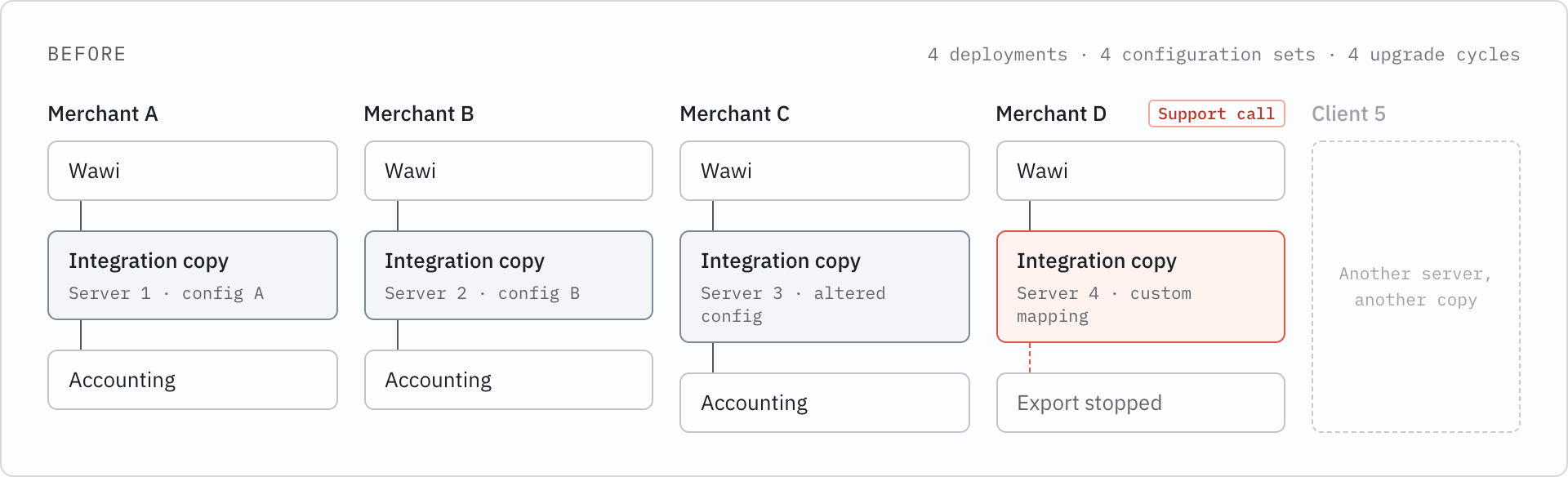
You may Already have a Cloud App
You do not need to invent something new from scratch. Start with your existing projects. Take your last 20 JTL projects and group them by the problem they solved, rather than the client they were built for.You’re looking for four signals:- The same request keeps coming back. Three or more clients asked for roughly the same thing.
- The logic stays the same and only the configuration changes. Different field mappings or thresholds, same core process.
- The problem isn’t tied to one merchant’s quirks. It’s something any merchant in that situation would need.
- Clients would buy it without a meeting. If a merchant saw it in a store, they’d understand what it does and why they need it.
- accounting exports
- shipping and label workflows
- custom reporting dashboards
- marketplace-specific data preparation
- stock and purchasing alerts
Your Clients Keep Using JTL-Wawi
One of the first questions you may have is: Does moving the integration to the cloud mean my client has to change their ERP?No.JTL-Wawi stays where it is. The merchant continues using Wawi as their ERP, while JTL Cloud provides the connection that allows a Cloud App to work with it. JTL describes this as a hybrid setup: Wawi continues to run locally, while cloud services and apps connect to it through JTL Cloud.Connecting takes two steps on the merchant’s side:- Connect Wawi to JTL Cloud. In the Admin menu, under JTL Cloud, they click Connect and sign in with their JTL ID.
- Start the JTL-Wawi API with the cloud connection switched on. They do this in the JTL Administrator.
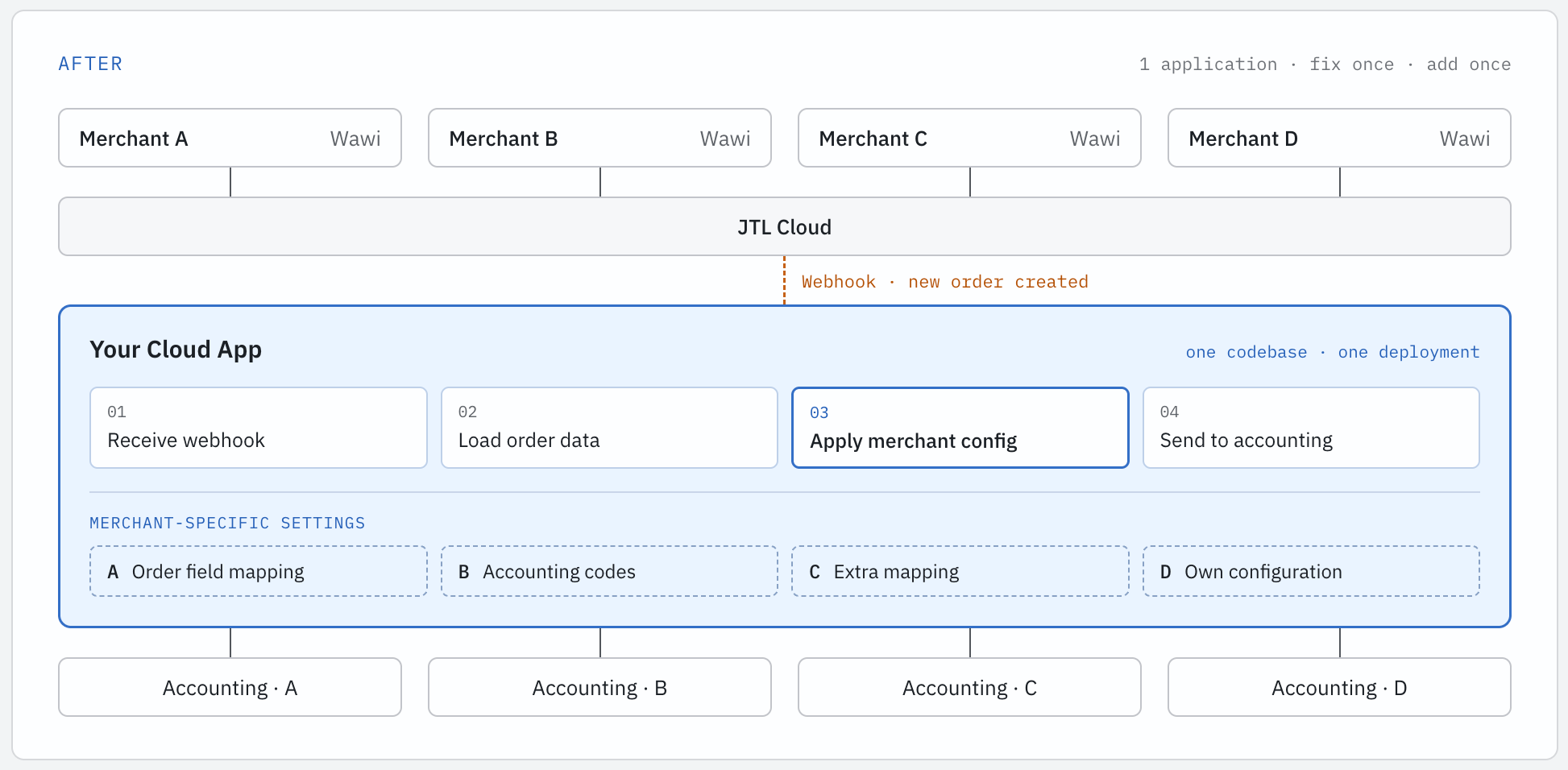
The biggest change is the packaging. Instead of maintaining a separate integration for every customer, you build one application that can serve multiple merchants.
The Path: Start with One Client
You do not need to turn your whole business into a product overnight. A practical way to start is with one client you already know well.Step 1: Start with a willing client. Pick an existing client whose integration you understand and who is comfortable connecting their Wawi to JTL Cloud.Step 2: Turn their integration into a private app. Private apps can be shared with specific merchants using activation codes, without going through the public App Store reviews. The client’s workflow can stay largely the same while you move the integration into the Cloud App model.Step 3: Add a second client. This is where you find out which parts of the integration are genuinely reusable. Differences that once lived in custom code now need to become configuration. That is the step where a client project starts becoming a product.Step 4: Publish to the App Store. Once the app works across different merchant setups, you can submit it for review and make it available to a wider audience.The important part is that you do not have to stop doing client work along the way. Your existing projects can give you the use cases, feedback, and revenue you need to build the product.How your Business Changes
The shift is not from services to products. It is from building the same solution repeatedly to getting more value from something you have already built.With a client-specific integration, most of the revenue comes from implementation and ongoing support. With a Cloud App, the same solution can be installed by multiple merchants. For App Store apps, JTL handles the merchant billing, while you manage your payouts through Stripe connect.Your services business still has a role. It can move toward work where your expertise adds more value:- Onboarding: helping merchants connect Wawi and configure the app.
- Customisation: handling requirements that fall outside the standard product.
- Consulting: helping merchants improve their workflows around the app.
The Trade-offs
A Cloud App also comes with responsibilities that you may not have had with a one-off integration.You own the application. Hosting, uptime, monitoring, and maintenance become part of the product. Managed hosting and basic monitoring can take care of much of the operational work.You build for multiple merchants. Your app needs to keep each merchant’s data and configuration separate. The JTL tenant becomes an important part of how you map a merchant to your own application data, so it is worth getting that model right early.Public apps go through review. App Store distribution adds a review step. Starting with a private app lets you validate the product with real merchants before taking it public.The merchant still depends on JTL-Wawi. Your Cloud App can only work with JTL-Wawi data when the required JTL-Wawi API connection is running. Make this part of onboarding and your support process so merchants know what to check if their connection stops working.These are not unusual problems for a product business. They are simply the responsibilities that come with moving from maintaining individual integrations to maintaining an application that serves multiple merchants.Where to Start
If you’ve read this far, you probably already have an integration in mind. Here’s how to take the first step:- Read What are JTL Cloud Apps? if you skipped it, to see what the platform can do.
- Follow the connection guide to connect a test Wawi to JTL Cloud.
- Work through the quickstart to get a first app running inside the Cloud ERP.
- Pick one client and plan their integration as a private app.